Doc Station
Passports, IDs, insurance papers, contracts, certificates and the household paperwork nobody can ever find - all in one private place instead of spread across email attachments, a desk drawer and three old phones. Upload the file or photograph it, tag it by type and category, add the issue and expiry dates, and leave a note about what it is for. A document organizer app free to start, and searchable the second an office, a school or a bank asks you for proof.



Everything in one record
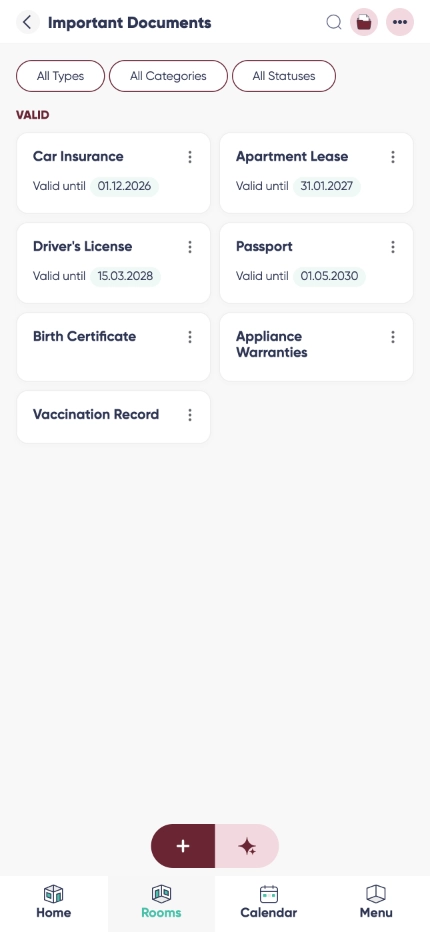
More than a document storage app: each file carries its own type, category, issuer, issue and expiry dates and a note, so you know what you are looking at before you open it.

A warranty tracker app, built in
Put the expiry or renewal date on the document and Listub reminds you before it runs out - the passport, the insurance policy and the two-year warranty on the washing machine all handled the same way.

Organized categories
Filter by category and type instead of scrolling: personal, family, work, finance, health, travel, legal, property, vehicle and insurance are all there from the start.

Up to 1 TB storage

Private by default, shared on purpose
Why choose Listub Doc Station?
The moment somebody asks for proof is the worst moment to start searching. An important documents app earns its place by making that moment boring: consistent categories, real dates and a search that reaches the note you wrote, so the right file is two taps away rather than somewhere in a folder called Scans 2.
Renewal tracking takes the stress out of passports, IDs, licences, policies and certificates. Instead of discovering an expiry at an airport check-in desk, you get the reminder weeks earlier and renew during a normal week.
It syncs across your devices and stays available without a connection, so a stored copy is still there on a plane, in a basement office or abroad on a bad network. Anything you change reconciles by itself once you are back online.
Family records
As a family documents app it holds birth certificates, vaccination records, school paperwork and policies in one place, so whoever needs the document does not have to ask whoever filed it.
Insurance and contracts
An insurance documents app and a contract archive at once: the policy, the renewal date, the claim reference and the employment or rental agreement, each with the note explaining what it covers.
Receipts and proof of purchase
Used as a receipt organizer app it keeps the proof of purchase attached to the warranty date, which is exactly what a shop asks for when the appliance fails in month twenty-two.
Frequently asked questions
Is there an app to store ID and passport copies?
Yes, that is one of the main reasons people open Doc Station. Store the copy, add the expiry date, and it is on your phone when a form, a border desk or a booking asks for the number.
Is there a version for Android?
Yes. Doc Station runs on Android phones and tablets, and everything you file there is the same archive you see elsewhere.
Is there a version for iPhone and iPad?
Yes, plus the web. Photograph the document with the phone and read it later on a laptop.
Is Doc Station free?
Yes. Storing documents, categories, dates and expiry reminders are all on the free plan, and you only look at Premium once you want to invite other people into your own rooms.
Does it work offline?
Yes. Documents you have opened recently stay available without a connection, and new entries or edits queue up and sync as soon as you are back online.
How does sharing work?
You choose the recipient per document, and the file is reached through a private link that expires rather than a permanent public URL. You can stop the access again at any time.
Can I track expiries?
Yes. Add the issue and expiry or renewal date and a reminder arrives ahead of the deadline, so you renew calmly instead of reacting late.
Can I share my rooms with family or friends?
Sharing your own rooms is a Premium feature. On the free plan your rooms are yours alone, on your own device, and you can't invite anyone into them - but you can always join a room that a Premium member shares with you and use it fully.
Add it by just asking
No forms, no menus. Tell Listub AI what you want and it lands here, ready to go.
Try saying…