
Wishlist Box
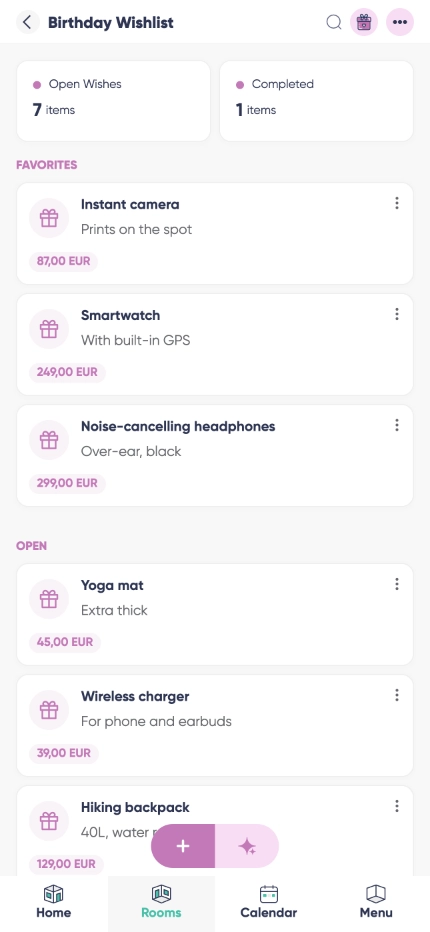
Wishlist Box is a wishlist app free to use for every occasion you have. Tag who the list is for (a friend on Listub, or just a typed name), pick a banner that matches the occasion, add items with photos, notes, priorities and as many stores as you like, then share one public link guests open in a browser. Reservations are tiered, so the surprise survives: guests mark what they are bringing while you see only as much as you want to see.



Occasion, banner and recipient
Set the occasion and its date, pick a banner to match, and tag the list to the person it is for - a friend on Listub or a name you type in, which is what most parents do when they list for a kid.

Public sharing without an account
Wanted an app to share wish list with family who will never install anything? The share link opens in any browser, and the token survives unpublishing, so the link you sent in March still works in December.

A wishlist app for family lists, not just yours
Keep a list per person in the same room: image, description, category, priority and one store entry per place it can be bought, each with its own price and link.

Surprise-safe reservations

Drafts that save together
Why use Wishlist Box?
A gift list app has one job: stop people buying the wrong thing twice. Wishlist Box does it with a banner, a recipient, an occasion date and items detailed enough that nobody has to ask which size or which colour, then makes sharing as easy as copying a link.
Tiered visibility means the same list handles both jobs. Turn the surprise on and you see only that something is spoken for; turn it off and you see who is bringing what, which is what you want when the whole family is coordinating one big present. Re-publishing keeps the same URL, so old links never go dead.
Birthdays
A birthday wish list app the aunts and uncles can actually use: send the link to the family chat, let them reserve, and watch the same jumper stop arriving three times.
Christmas
From November it becomes a Christmas wish list app for the whole household - one list per person, reservations hidden by default so nobody works out what is under the tree.
Weddings and baby showers
Used as a gift registry app it covers every price point at once, because each item can carry several stores, and guests never need an account to claim one.
Frequently asked questions
Is there a version for Android?
Yes. Listub runs on Android phones and tablets, and your lists, links and reservations stay in sync with everywhere else.
Is there a version for iPhone?
Yes, on iPhone and iPad, plus the web. Guests do not need any of it - a browser is enough to open your link.
Can I use it for Secret Santa?
Partly, and here is the honest limit: Listub is not a Secret Santa app and does not draw names or pair people up. What it does is hold everyone's list and hide who reserved what, so once your group has drawn names elsewhere, nobody can work out who bought them what.
Can people reserve gifts without an account?
Yes. The public link works without signing up. Each guest gets a random ID stored in their own browser, which is how that browser can later change its own reservations.
Will the share link change if I unpublish?
No. The token is persistent, so old links start working again the moment you turn sharing back on.
Does it track prices or buy anything for me?
No. Listub stores the wishes and the store links you added yourself. It is not a shop and it does not watch prices for you.
How much does it cost?
Nothing to start. Lists, items, banners and public share links are on the free plan, and you only look at Premium once you want to invite other people into your own rooms.
Can I share my rooms with family or friends?
Sharing your own rooms is a Premium feature. On the free plan your rooms are yours alone, on your own device, and you can't invite anyone into them - but you can always join a room that a Premium member shares with you and use it fully.
Add it by just asking
No forms, no menus. Tell Listub AI what you want and it lands here, ready to go.
Try saying…