
Quick Notes
A thought worth keeping usually arrives while you are doing something else, and it is gone by the time an app has finished loading. Quick Notes lives on the Home screen for exactly that moment: open it, type, save, carry on. Later you decide whether it becomes a proper note, a task, or nothing at all. A scratchpad app free to use and small on purpose.


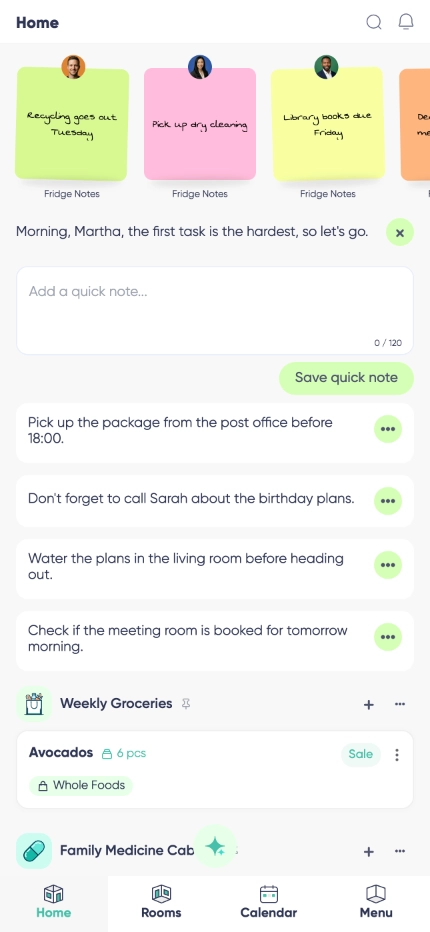

One tap and you are typing
A one tap note app in the literal sense: the box is already on the Home screen, so there is no room to pick, no title to invent and no menu between the thought and the text.

Built as a quick capture app
The typing surface is deliberately plain and immediate, because the only thing that matters at that moment is getting the sentence out of your head before it goes.

Save now, decide later
Nothing has to be filed, tagged or named on the way in. When a note turns out to matter, move it into a Note Base room and give it the structure it earned.

Instant save

Distraction-free
Why Quick Notes?
Most people already use a note to self app of some kind - a message sent to themselves, a photo of a whiteboard, a line at the top of a shopping list. Quick Notes replaces all of those with one place that is always in the same spot, and unlike a chat with yourself it does not scroll away.
Leaving structure until later is the point, not a shortcut. Early ideas get over-organized and then abandoned; a quick note stays a quick note until you know what it is worth, and then it moves into Note Base with one tap and no retyping.
It keeps working without a connection and syncs privately in the background, so you can catch something on a train and read it back at a desk.
Idea sparks
Used as a brain dump app at the end of a long day: get the six unrelated things out of your head in a minute, sleep, and sort out which ones were real in the morning.
Research fragments
A quote, a source, a number you will need later. Park it now and check it when you are back at a proper screen.
Meeting fragments
Catch the decision and the one thing you promised to do, then move it into a task or a note once the call is over.
Frequently asked questions
Is there a scratchpad app for Android?
Yes. Quick Notes is part of Listub on Android phones and tablets, sitting on the Home screen where you can reach it without opening anything else.
Is there a version for iPhone and iPad?
Yes, and on the web too. Capture on the phone, read it back on the laptop.
Is there an app to jot down thoughts without organizing them?
That is exactly what this is. There are no folders, no tags and no title field - just the box, the save button and the short list of what you have already written.
What makes it an app to write down ideas quickly rather than a normal editor?
Everything is stripped out of the path. The box is on the Home screen, it opens with one tap, and it saves immediately, so capture takes a couple of seconds instead of a couple of screens.
How long can a quick note be, and how many can I keep?
Up to 500 characters each, and up to 30 notes on the board at a time. It is a holding area on purpose - anything you want to keep for good belongs in a Note Base room.
Can I turn a quick note into a real note?
Yes. Move it into a Note Base room and the text goes with it, so you never retype anything. The quick note is removed once the move is done.
Is it free, and does it work offline?
Yes to both. Quick Notes is on the free plan, and it keeps working without a signal - notes queue up and sync on their own once you are back online.
Can I share quick notes with someone?
Quick Notes is your own scratchpad and stays private to you. When something is worth sharing, move it into a Note Base room first. Sharing your own rooms is a Premium feature, and you can always join a room a Premium member shares with you and use it fully.